🔥 LIMITED SEATS Advanced Excel Fast Track Online Course Only ₹2,000 🎓 Enroll Now
⏰ Offer Ends In

Advanced Excel Course in Vadodara – Master Data & MIS Reporting

Upgrade your corporate skillset with Arth Training Institute. Move beyond basic spreadsheets. Learn VLOOKUP, Power Query, PivotTables, and workflow automation with VBA Macros. Practical training designed for modern professionals.

Advanced Excel training classroom at Arth Training Institute, Vadodara

Advanced Excel Training in Vadodara

Advanced Excel has become one of the most in-demand skills for students, accountants, MIS executives, data analysts, business professionals, and office employees. At Arth Training Institute, our Advanced Excel Training in Vadodara is designed to help learners master Microsoft Excel through practical sessions, real-world business reports, dashboards, and automation techniques.

The course begins with Excel fundamentals and gradually moves to advanced concepts like formulas, functions, Pivot Tables, Pivot Charts, Conditional Formatting, Data Validation, Lookup Functions, Power Query, Power Pivot, Dashboard Creation, Macros, VBA basics, and business reporting.

Our trainers provide practical examples and live projects so that students gain confidence in handling large datasets, preparing MIS reports, financial reports, sales reports, HR reports, and business dashboards. Whether you are a beginner or an experienced professional, this course helps improve your productivity and prepares you for corporate job requirements.

Why Choose Advanced Excel Training at Arth Training Institute?

  • Learn from an industry-experienced trainer who brings real-world corporate scenarios into the classroom.
  • 100% Practical approach. Say goodbye to boring theory and start building dynamic dashboards on day one.
  • Work on live corporate datasets (sales performance, HR analytics, financial reports).
  • Flexible batch timings – choose between classroom training in Vadodara or interactive online sessions.
  • Comprehensive coverage from logical functions to data visualization and Power Query automation.

Excel Training Programs We Offer

Advanced Excel for MIS Reporting

Perfect for analysts and back-office staff. Learn how to extract, clean, and summarize massive datasets using advanced lookup functions and dynamic PivotTables.

Corporate Excel Training & Workshops

We provide tailored onsite corporate Excel training in Vadodara. Upskill your sales, finance, or HR teams to improve efficiency and reduce manual data entry time.

Data Analysis with Excel & Power Query

Dive into data transformation. Learn how to merge files, clean raw exports, and automate monthly reporting using the game-changing Power Query tool.

VBA Macros for Beginners

Take your automation to the next level. This module introduces the logic of VBA, teaching you how to record and edit Macros to perform repetitive tasks with a single click.

Who Should Join?

Our Advanced Excel course in Vadodara is a must-have skill for:

  • MBA, BBA, B.Com, and CA students preparing for the corporate world.
  • Data Analysts, MIS Executives, and Operations Managers.
  • Sales and Marketing professionals who need to track KPIs and build performance dashboards.
  • Anyone spending hours on manual reporting looking to automate their daily tasks.
Advanced Excel Overview

Our Advanced Excel Training in Vadodara bridges the gap between knowing basic formulas and managing large-scale business data. Microsoft Excel remains the backbone of the corporate world, and true proficiency means knowing how to make the software work for you.

This training is highly project-oriented. You won't just learn what a formula does; you'll learn when and how to combine multiple functions (like INDEX and MATCH or nested IFs) to solve complex business logic.

Prerequisites

  • Basic familiarity with Microsoft Excel interface.
  • Understanding of basic arithmetic operations and cell referencing.
  • Access to a laptop with MS Office installed for home practice.
  • No prior coding experience is required for the VBA fundamentals.

Key Learning Outcomes

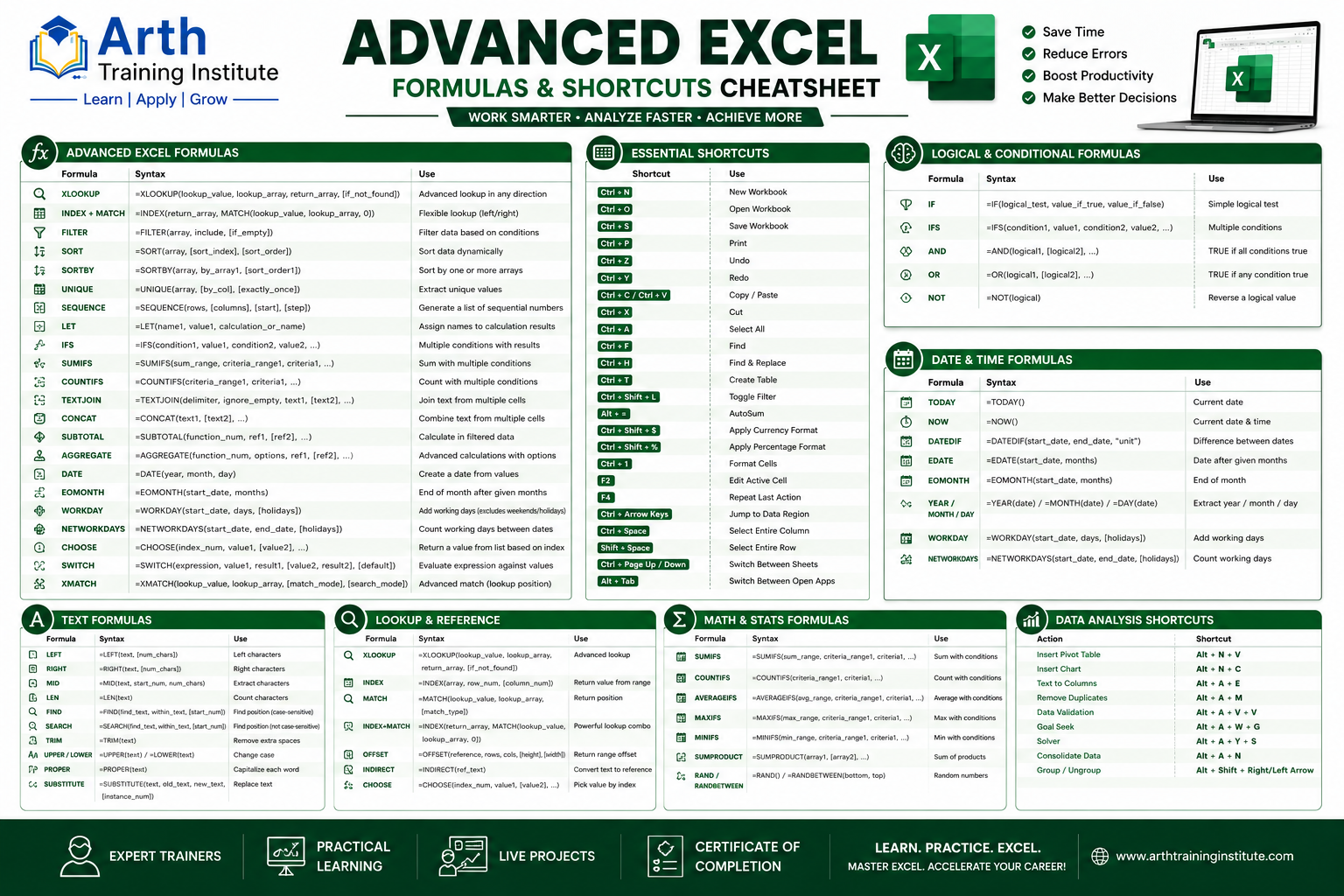
  • Speed up your work with advanced keyboard shortcuts.
  • Eliminate errors with Data Validation and Conditional Formatting.
  • Perform multi-criteria lookups using XLOOKUP and INDEX-MATCH.
  • Summarize millions of rows instantly with PivotTables.
  • Build visually appealing, interactive Dashboards with Slicers.
  • Automate tedious data cleaning using Power Query.
  • Record and deploy time-saving VBA Macros.
Advanced Excel Formulas & Shortcuts Cheatsheet

What You Will Learn in Advanced Excel Course

Our Advanced Excel Course Curriculum covers everything required by today's companies. The course is designed to build strong Excel fundamentals, advanced formula skills, data analysis capabilities, reporting knowledge, and automation skills for practical business applications.

Module 1: Excel Fundamentals

  • Workbook Management
  • Worksheets
  • Formatting
  • Tables
  • Sorting
  • Filtering

Module 2: Advanced Formulas

  • IF
  • Nested IF
  • IFS
  • AND
  • OR
  • COUNTIF
  • SUMIF
  • SUMIFS
  • COUNTIFS
  • AVERAGEIF

Module 3: Lookup Functions

  • VLOOKUP
  • HLOOKUP
  • XLOOKUP
  • INDEX
  • MATCH
  • INDEX + MATCH

Module 4: Data Analysis

  • Pivot Tables
  • Pivot Charts
  • Slicers
  • Timelines
  • Dashboard Creation
  • Data Validation

Module 5: Advanced Excel Features

  • Conditional Formatting
  • Power Query
  • Power Pivot
  • Flash Fill
  • Text Functions
  • Date Functions
  • Financial Functions

Module 6: Excel Automation & Business Reporting

  • Macros
  • VBA Basics
  • Report Automation
  • Business Reporting

Advanced Data & Automation Modules

Data Analysis with Pivot Tables
  • Creating and customizing Pivot Tables.
  • Calculated Fields and Items in Pivot.
  • Grouping Data (by Dates, Text, Numbers).
  • Pivot Charts and Visualizations.
  • Using Slicers and Timelines for interactivity.
Data Visualization & Dashboards
  • Choosing the right chart (Bar, Column, Pie, Line).
  • Advanced Charts: Waterfall, Doughnut, Combo Charts.
  • Creating dynamic charts tied to drop-downs.
  • Designing an interactive MIS Dashboard from scratch.
Power Query (Data Transformation)
  • Importing data from multiple sources (CSV, Web, Folders).
  • Cleaning messy data without formulas.
  • Appending and Merging Queries.
  • Unpivoting data columns.
  • Loading transformed data to Data Model.
Introduction to Macros & VBA
  • Understanding the Developer Tab.
  • How to Record, Run, and Edit a Macro.
  • Absolute vs Relative referencing in Macros.
  • Assigning Macros to buttons and shapes.
  • Basic VBA syntax and editing code modules.

Career Opportunities After Advanced Excel Training

Learning Advanced Excel opens many career opportunities across different industries. After completing the Advanced Excel Training, students can apply for various data analysis, reporting, finance, administration, operations, and business-related job roles.

Job Roles After Advanced Excel Course

  • MIS Executive
  • Data Analyst
  • Business Analyst
  • Reporting Executive
  • Financial Analyst
  • Accounts Executive
  • Operations Executive
  • Office Administrator
  • HR Executive
  • Inventory Executive
  • Sales Analyst
  • Project Coordinator

Your Instructor

Learn from an industry expert with proven excellence in training, consulting, and mentoring.

Mr. Adarsh Patel
Mr. Adarsh Patel
Corporate Trainer & Business Consultant 15+ Years Experience

Education: MCA (2009), B.Com (Computer) (2006)

Experience: Over 15 years delivering corporate training, consulting, and mentoring across IT, digital transformation, and data management domains.

Recognized for designing practical, project-based learning experiences and helping 2000+ students & professionals build strong careers.

  • Data & Automation Tools: Advanced Excel, Power Query, VBA Macros, Dashboarding.
  • Programming: PHP, Python, Java, C/C++
  • Databases: MySQL, MongoDB, SQL Server
  • Digital Tools: SEO, CRM, ERP, WordPress, AI Tools

Delivered 200+ Expert Lectures and 80+ Workshops. Medium of Communication will be in English, Hindi, or Gujarati.

  • Corporate training on Advanced Excel and MIS Reporting.
  • Hands-on coding and data analytics bootcamps.
  • Special workshops for entrepreneurs on business automation.

Advised startups and enterprises on technology adoption and workflow automation.

  • 150+ consulting assignments with SMEs and corporates.
  • Expert in automating business processes using Excel and CRMs.
  • Recognized with multiple Appreciation Certificates from universities and corporates.
  • Collaborated with 50+ organizations for training & development.
  • Trained 2000+ students and professionals successfully.
View Full Profile

Frequently Asked Questions — Advanced Excel Training

The course duration is typically 1 to 2 months depending on the batch frequency (weekdays vs. weekends). Fast-track intensive options are available upon request for working professionals.
Yes, we include an introduction to Macros and VBA. You will learn how to record macros, understand the Visual Basic editor, and write basic scripts to automate repetitive daily tasks.
Basic computer literacy and foundational knowledge of opening, saving, and entering basic data into Excel is required. However, we do start with a quick refresher before jumping into advanced formulas.
Absolutely. The curriculum is heavily aligned with MIS (Management Information Systems) roles. You will practice on corporate data sets to build interactive, live dashboards.
Yes. Every participant receives a certificate of completion from Arth Training Institute, validating your practical Excel and analytical skills for employers.
Yes! The training includes practical mini-projects like preparing sales performance dashboards, HR payroll reports, and cleaning messy data exports using Power Query.

Fees Structure

Our fees structure is flexible depending on the batch type and audience. We provide specialized Excel training for individuals, college students, and customized batches for working professionals. We also conduct onsite corporate training across Vadodara and nearby areas for company teams.

  • Regular Batch (1 to 2 Months) – ₹5,000/- to ₹7,000/- (Enquire for exact module pricing)
  • Online Batch – Discounted rates available
  • Personal 1-to-1 (Per Hour) – ₹1,000/-
  • Group / Corporate Enrollment – Special discounted fees available
  • Weekend Batch (Saturdays/Sundays) – Contact us for availability

Recent Feedback and Reviews

★★★★☆ 4.8 (Based on 337 Google Reviews)

Share with Your Friends: